

Case #009 - Amazon Blocks Inbound Shipments for an Active ASIN
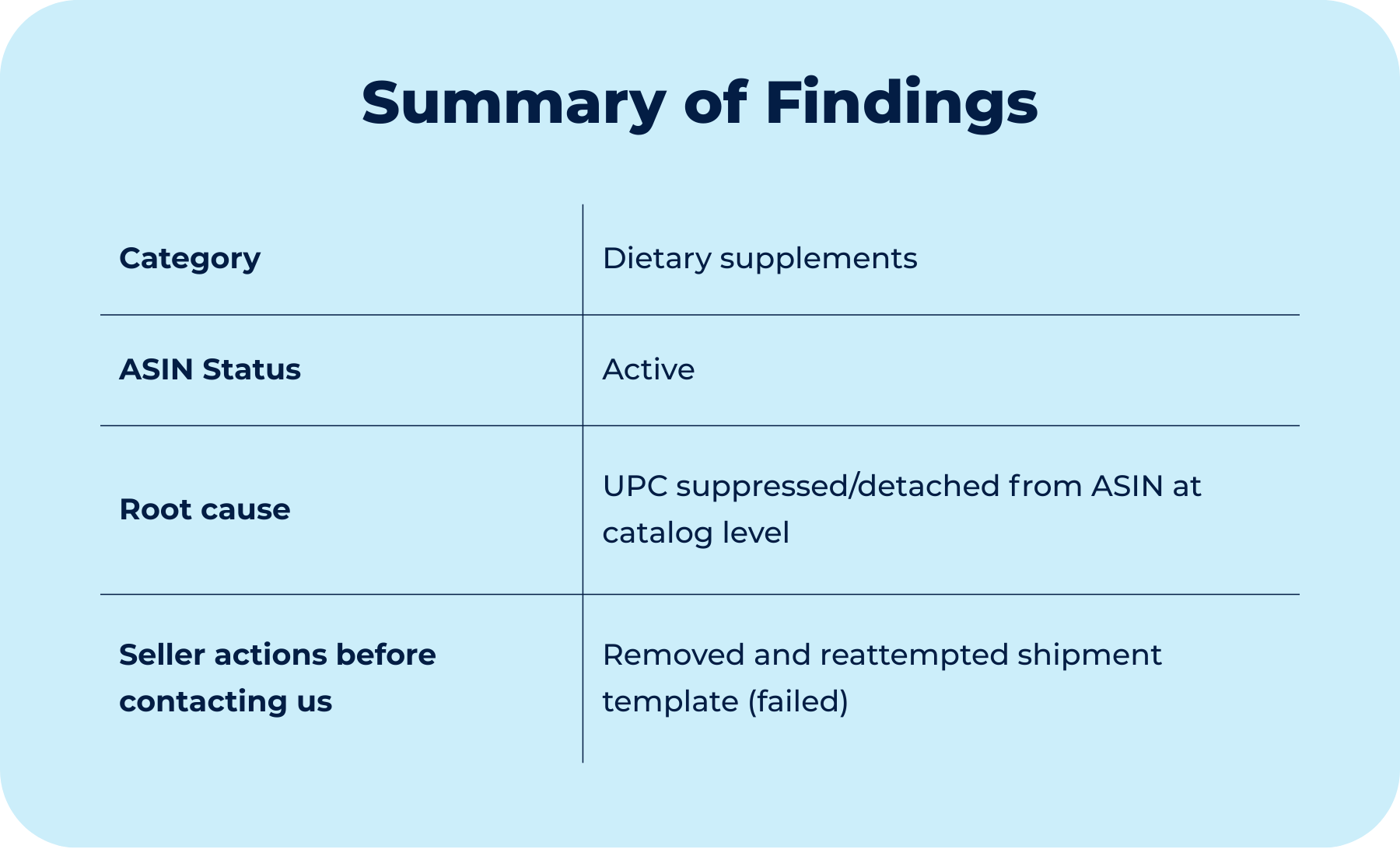
The seller couldn't send inventory to FBA, even though the ASIN was active and sellable. The error pointed to a manufacturer barcode issue that the seller never changed.
If you’re new here, welcome.
If you’ve been reading for a while, thank you for being here.
Each week, we break down one real Amazon case from the field. Not to share tactics, but to decode how Amazon’s system actually behaves and what to do when it breaks.
All past cases live in a single searchable archive, built to help you identify recurring patterns across time.

Context
When the inbound system blocks shipments while the listing stays active
A 3PL warehouse reported that it could no longer create or send an inbound shipment for an ASIN. The shipment workflow was blocked by a system error that appeared consistently during shipment creation.
Amazon displayed the following message: “The product for this offer is no longer eligible to send to Amazon as it has a manufacturer barcode that’s been removed from the ASIN.”
From the warehouse’s perspective, no changes had been made to the product, packaging, or labeling. The same physical inventory, with the same printed UPC, had previously been accepted into Amazon’s fulfillment network without issue.
As an initial troubleshooting step, the shipment plan was removed and reattempted. The error persisted, and the system continued to block shipment creation, providing no additional guidance on corrective steps.
At the listing level, the ASIN remained active and sellable. There were no visible suppressions, no Account Health notifications, and no warnings related to inventory, brand, or compliance. The problem surfaced only at the inbound logistics stage, when attempting to send inventory to FBA.
At this point, the situation raised a narrow but critical question: how could an ASIN remain active and sellable, yet become ineligible for inbound shipments due to a manufacturer barcode issue that the seller did not intentionally change?
Diagnostic
Why did the error appear at inbound, not at the listing level
The error was not a shipment plan issue. It was a catalog UPC eligibility issue tied to the ASIN’s manufacturer barcode.
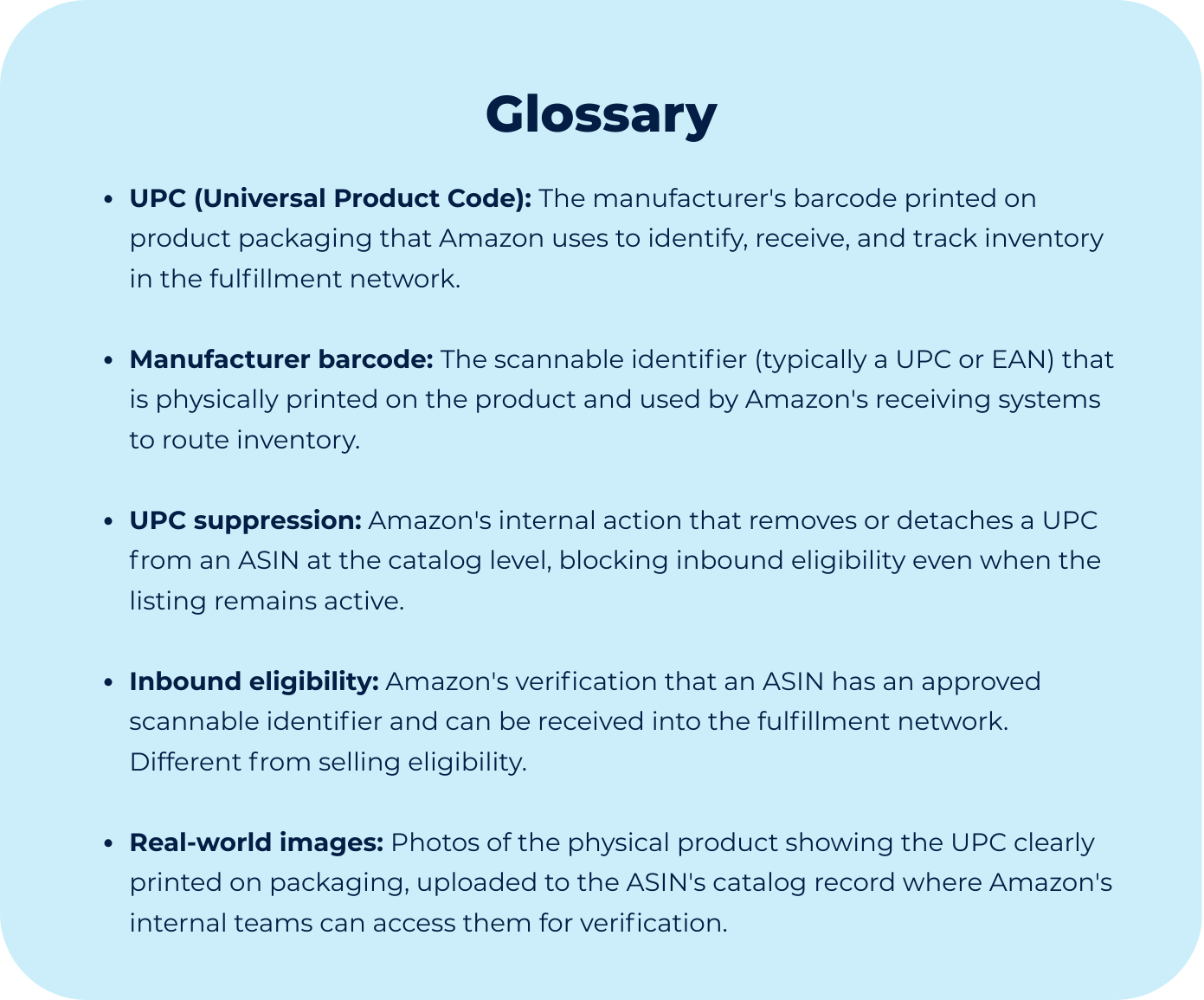
Amazon’s inbound system determines whether an ASIN can be shipped to FBA based on whether the offer is correctly linked to an accepted scannable identifier. For most retail products, that identifier is the UPC (manufacturer barcode). If Amazon’s catalog no longer recognizes a valid code on the ASIN, the inbound workflow blocks shipment creation because Amazon cannot reliably receive, scan, and route units inside the fulfillment network.
In this case, the UPC had become detached or suppressed at the catalog level for the ASIN. The key diagnostic signal was the language Amazon used: “manufacturer barcode … has been removed from the ASIN.”
That phrasing indicates the system no longer considers the ASIN eligible for manufacturer barcode receiving.
Two diagnostic facts mattered:
1. This failure happens upstream of the shipment plan: Removing or changing the inbound settings does not fix the issue because the template controls packaging and prep settings, not catalog UPC. The block occurs before shipment parameters matter, at the eligibility check stage.
2. The ASIN can remain active while inbound eligibility is blocked: An ASIN can still appear normal in Seller Central (active, purchasable, no visible suppression) while the inbound system rejects shipments. These are two separate layers: customer-facing listing status versus fulfillment receiving eligibility. The inbound layer is stricter because it depends on a scannable UPC.
The diagnostic conclusion was that the warehouse error required a UPC unsuppression/reattachment, not an inbound workflow misconfiguration.
In cases like this, the hardest part is recognizing that the problem lives at the catalog level, not the shipment configuration level.
When Amazon blocks inbound shipments for an active ASIN, understanding that the issue is UPC suppression (not workflow misconfiguration) determines whether you escalate correctly or waste weeks adjusting settings that don’t matter.
Though Process
Why configuration changes can’t fix authority problems
When a shipment workflow breaks, the instinctive response is to adjust workflow settings. Remove the template. Toggle barcode settings. Recreate the shipment from scratch. These actions feel productive because they’re within seller’s control and they’ve worked before for other issues.
But not all Amazon errors are configuration problems. Some are catalog suppression issues, and when Amazon has detached a UPC from an ASIN at the catalog level, no amount of configuration adjustment will restore it.
Insight #1: Amazon’s error language maps directly to the system layer that failed
Amazon’s message was precise: “The product for this offer is no longer eligible to send to Amazon as it has a manufacturer barcode that’s been removed from the ASIN.”
This phrasing does not describe a packaging rule, a prep setting, or a shipment configuration. It describes a break in the relationship between the ASIN and its UPC. The word “removed” signals that something was detached at the catalog level, not misconfigured by the seller, but actively removed by Amazon’s systems.
When Amazon’s language points to barcode removal, the problem lives at the catalog level, not the logistics configuration level. Configuration changes operate downstream of this check. If the system no longer recognizes the UPC for that ASIN, it never reaches the stage where template settings matter.
Insight #2: Selling eligibility and inbound eligibility are governed by different systems
These systems don’t talk to each other in real time. That’s why your ASIN can look perfectly normal in Seller Central (active, no warnings, no Account Health violations) while simultaneously being blocked from inbound shipments.
Insight #3: UPC recognition is controlled by Amazon’s catalog systems, not seller inputs
Amazon can suppress a UPC for several reasons that are invisible in Seller Central:
Identifier conflicts across ASINs
Duplicate UPC usage elsewhere in the catalog
Data augmentation overrides
Internal catalog cleanup or validation routines
When this happens, sellers cannot simply “add the UPC back” through flat files or templates. UPC recognition at the catalog level is not a field seller’s control, it’s managed by Amazon’s internal catalog systems, which can suppress or detach UPCs for reasons that aren’t visible in Seller Central.
Insight #4: Amazon requires physical proof to restore UPC recognition
When a UPC has been suppressed, Amazon doesn’t restore it based on:
Historical usage (the UPC worked before)
Seller assertions (we own this UPC)
Catalog data (the UPC is in our flat file)
Amazon requires confirmation that the barcode, GS1 certified and owned by the same brand and it is physically printed on the product and corresponds to the ASIN. The system will not restore catalog-level recognition based on data alone, it needs verification that the UPC exists in the real world, not just in Amazon’s database.
Insight #5: UPC suppression requires escalation to catalog teams, not general support
General Seller Support cannot restore a suppressed UPC because they don’t control catalog-level barcode recognition. They can help with template issues, prep requirements, or shipment configurations, but not with UPC suppression.
Only internal catalog teams with authority over UPC validation can unsuppress or reattach a UPC to an ASIN. This means the issue must be routed to the team responsible for catalog-level barcode management, not handled through standard shipment troubleshooting workflows.
