

Case #016 - 💸$69,003.33 Left the Account
A disbursement was initiated. The balance was reduced. The funds did not arrive. No failure notification was sent. The Disbursements page returned always an error.

If you’re new here, welcome.
If you’ve been reading for a while, thank you for being here.
Each week, we break down one real Amazon case from the field. Not to share tactics, but to decode how Amazon’s system actually behaves and what to do when it breaks.
All past cases live in a single searchable archive, built to help you identify recurring patterns across time.

Context
What a disbursement actually is
A disbursement is how Amazon pays you. Every two weeks, Amazon closes out your settlement period, calculates what you are owed after fees, refunds, and reserves, and transfers that balance to your registered deposit method.
Note: That deposit method is either a bank account or, if you are enrolled in Express Payout, a Visa debit card.
That distinction matters more than most sellers realize because standard ACH transfers take 3 to 5 business days to clear, while Express Payout, Amazon’s faster disbursement program, gets funds to an in-network bank account or a Visa debit card within 24 hours, including weekends, so for sellers managing inventory, ad spend, or supplier payments, that speed difference is a cash flow decision.
Additionally to that (and this matters for the case), sellers do not often initiate disbursements manually, simply because Amazon processes them automatically at the close of each settlement period, roughly every 14 days. A seller can also request a manual disbursement at any time, provided their account is in good standing and their deposit method is verified.
With that foundation in place, here is what this case looked like from the seller’s side.
Three disbursements had already failed. Each one followed the same pattern: transfer rejected, funds returned to the balance, failure notification in the inbox.
The seller knew there was a problem with their deposit method and added a Visa debit card as an alternative before requesting a fourth disbursement of $69,003.33.
This time, the disbursement failed again, but the Amazon balance dropped by $69,003.33, the bank received nothing, and Amazon sent no notification.
Diagnostic
The exception state and why standard tools cannot see it
A disbursement follows a simple system process.
Amazon generates a transfer instruction, passes it to a banking partner, waits for an acknowledgment, and records the result.
Each stage produces a defined outcome:
If the transfer is never sent, the balance remains unchanged.
If the bank rejects the transfer, the funds return to the balance with a notification.
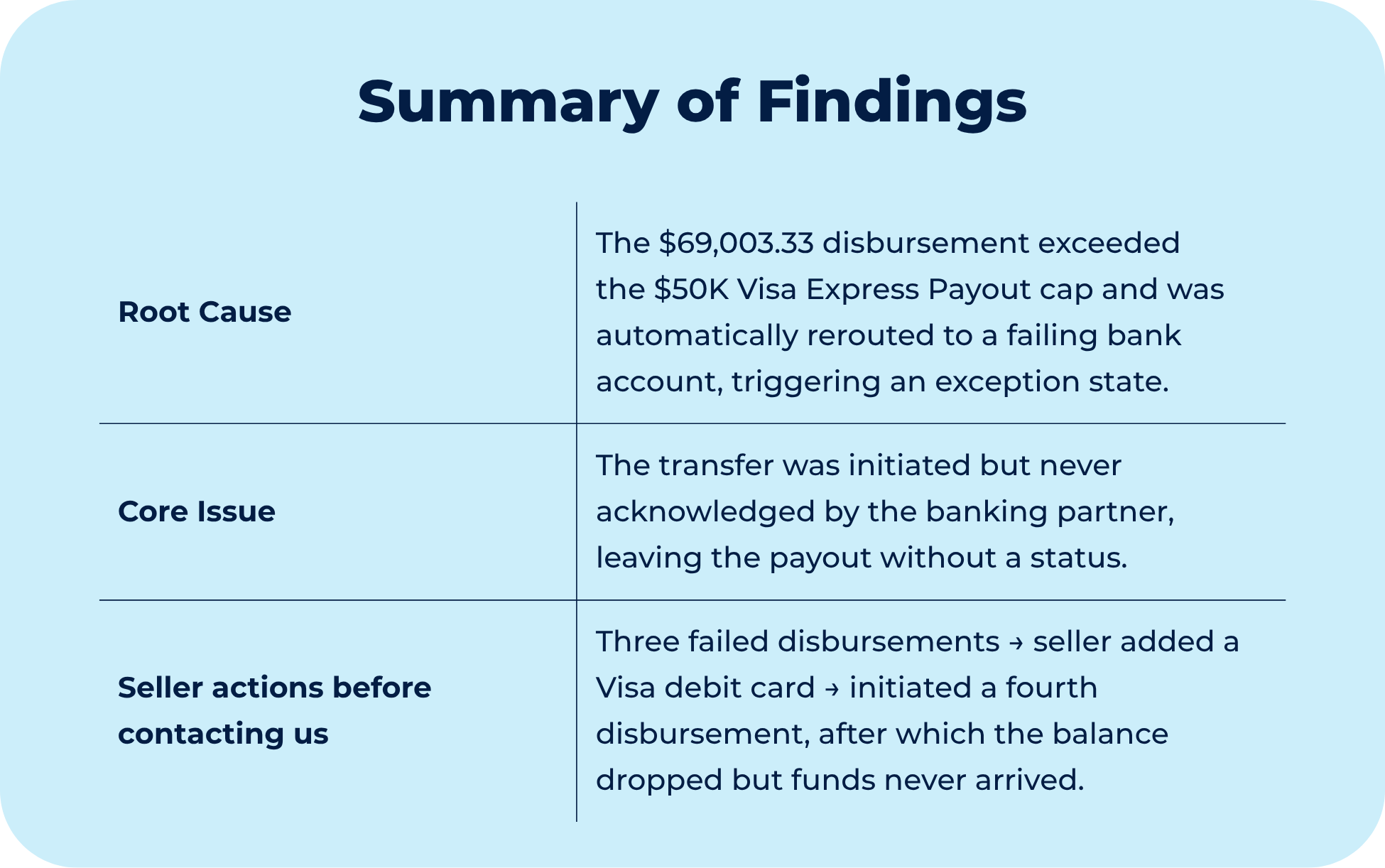
If the transfer is sent but never acknowledged, the system records no payout status.
This case produced the third condition. In Amazon, this is called an exception state.
The issue originated at the routing stage and traces back to a policy: Express Payout through a Visa debit card carries a hard limit of $50,000 per transaction. When a disbursement exceeds that amount, the system does not decline it. Instead, it reroutes automatically to the active bank account on file.
In this case, the bank account on file was the same account responsible for the prior three failed transfers.
After repeated failures on the same account, the system did not produce another standard rejection. The disbursement entered an exception state. The balance was reduced, the transfer was initiated, and the banking partner’s acknowledgment never arrived.
The Disbursements page error the seller encountered, appearing only for that specific settlement period while all others loaded correctly, was a symptom of the missing payout status.
The backend and the Seller Central interface draw from the same underlying records, so both surfaces returned the same gap. What looked like two separate problems, a broken page and a missing payment, was in fact a single condition reflected in two places.
The funds were not lost. They were suspended in a state that the system has no automated path to resolve.
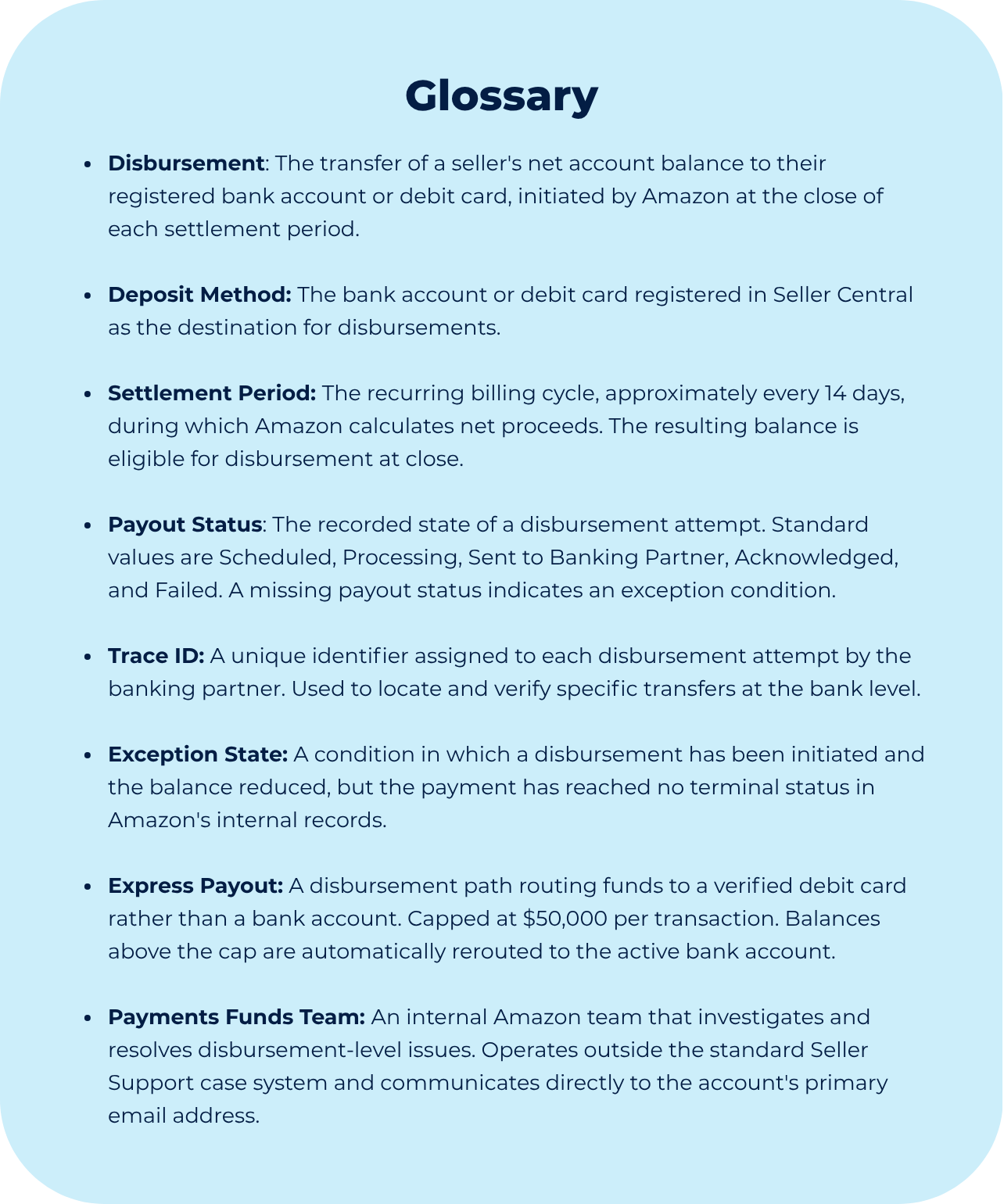
If you are dealing with a missing disbursement, a Seller Central error on your Payments page, or a payout that has not returned to your balance, contact the Online Seller Solution team directly before escalating on your own.
Though Process
Reading the signals before reaching for support
When a disbursement behaves unexpectedly, the instinct is to open a case immediately.
That is understandable, but in cases like this, Seller Support is only as useful as the information it can access. For that reason, before escalating, we first tried to determine where the process failed, because the answer determines who can actually fix it.
Three signals were available before any ticket was opened, and each one carried a diagnostic value.
The settlement table is the most reliable audit tool a seller has access to.
Every period’s beginning balance shows what happened to the previous disbursement, regardless of what the interface reports. In the three standard failures, the following period’s opening balance included the returned funds. After the fourth disbursement, it did not. Reading the balances in sequence reveals the outcome more clearly than any support interaction.
The disbursement email record is the second signal.
Amazon sends a notification for successful and failed payouts. A disbursement that produces neither is different from standard failure, and that absence indicates the problem occurred in the middle of the process rather than at the endpoints.
The scope of the page error is the third.
An error isolated to a single settlement period, while all surrounding periods load correctly, indicates a data gap in that specific payout record rather than a platform-wide issue. That isolation is itself diagnostic: it shows the problem is tied to one event and helps narrow where to investigate.
Taken together, these three signals identified the exception state before any internal tools were required.
